 HushmossScreen Time Tracker
See where today went. Pause what you choose.
A calm screen time tracker: today against your 7-day average, a 24-hour strip of when you used your phone, unlocks and app opens, plus daily limits with a breathing pause screen. No Accessibility service, no account, and your usage never leaves your phone.
- Screen time, unlocks and a 24-hour strip of your day
- Daily limits with a breathing pause screen
- No Accessibility service, no account, no uploads
Coming soon to Google Play.
Swipe through Hushmoss
A pause screen when your limit is up 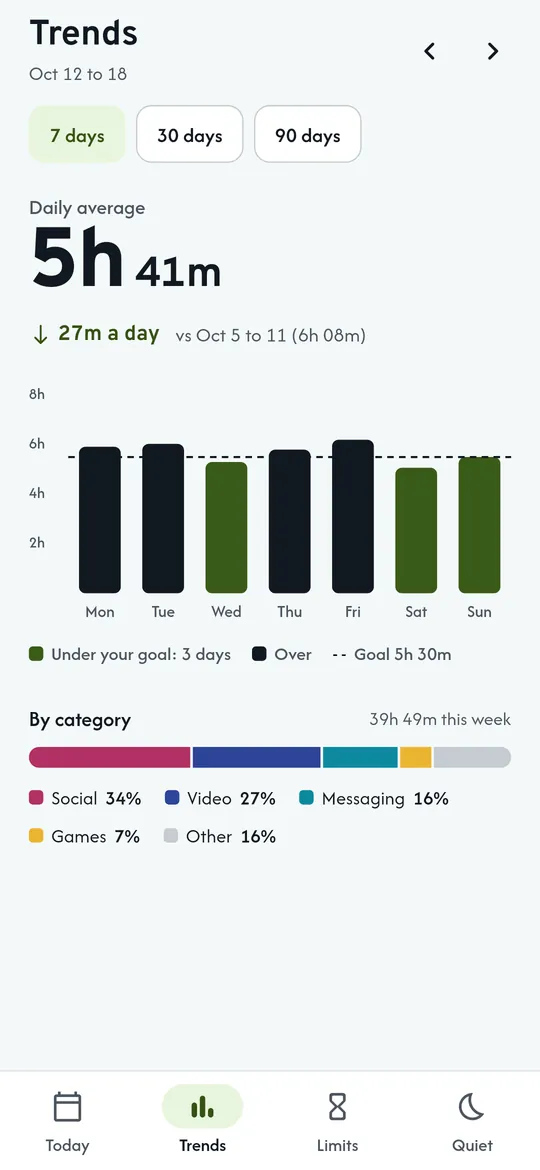
Weekly trends against your goal 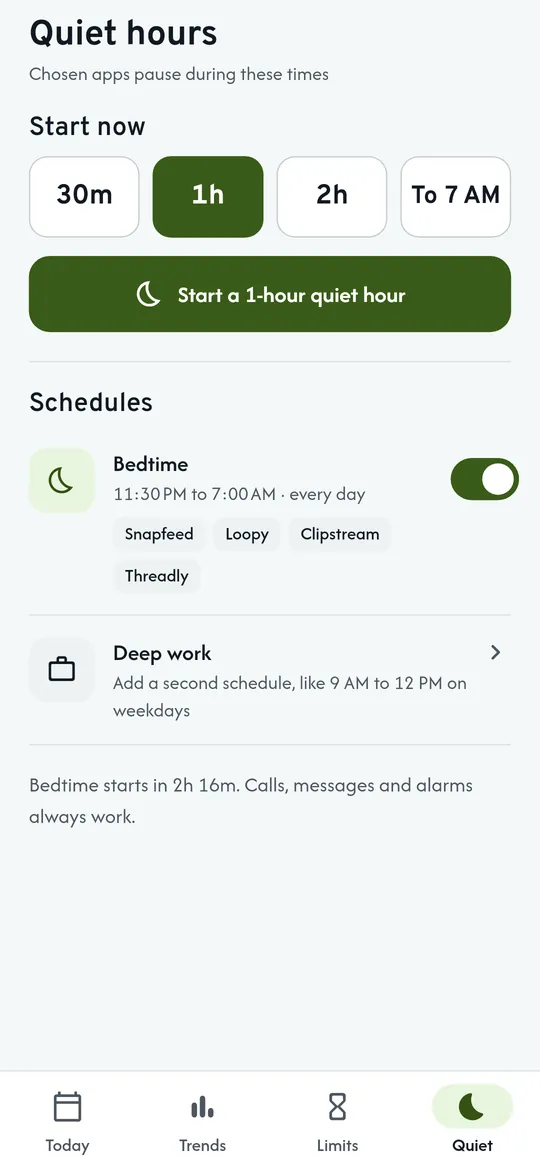
Quiet hours
What you can do
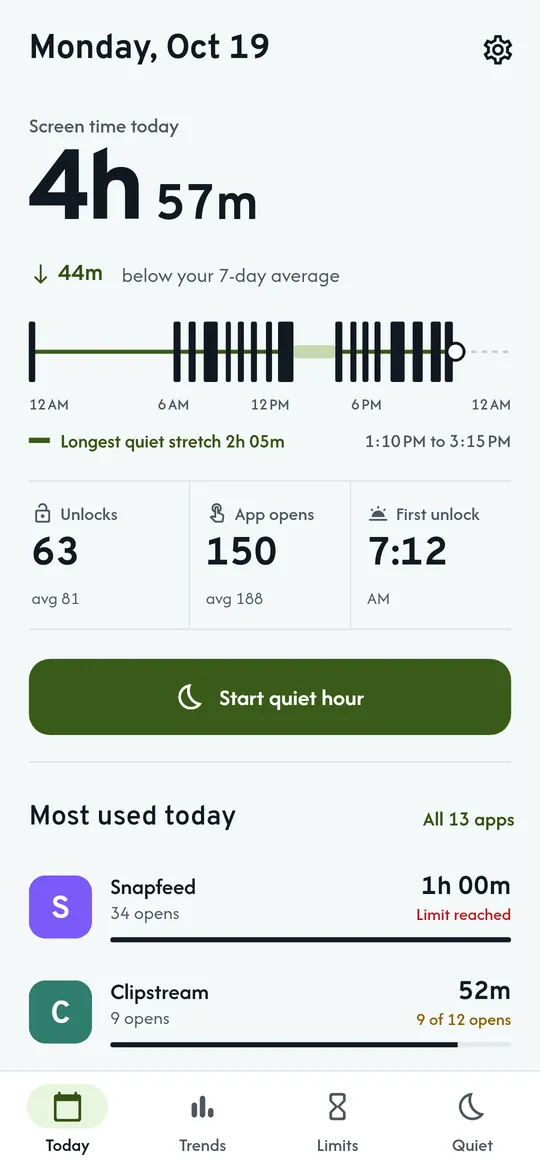
Today at a glance. Screen time against your 7-day average, a 24-hour strip of when the phone was in use, your longest quiet stretch, unlocks, app opens and first unlock.
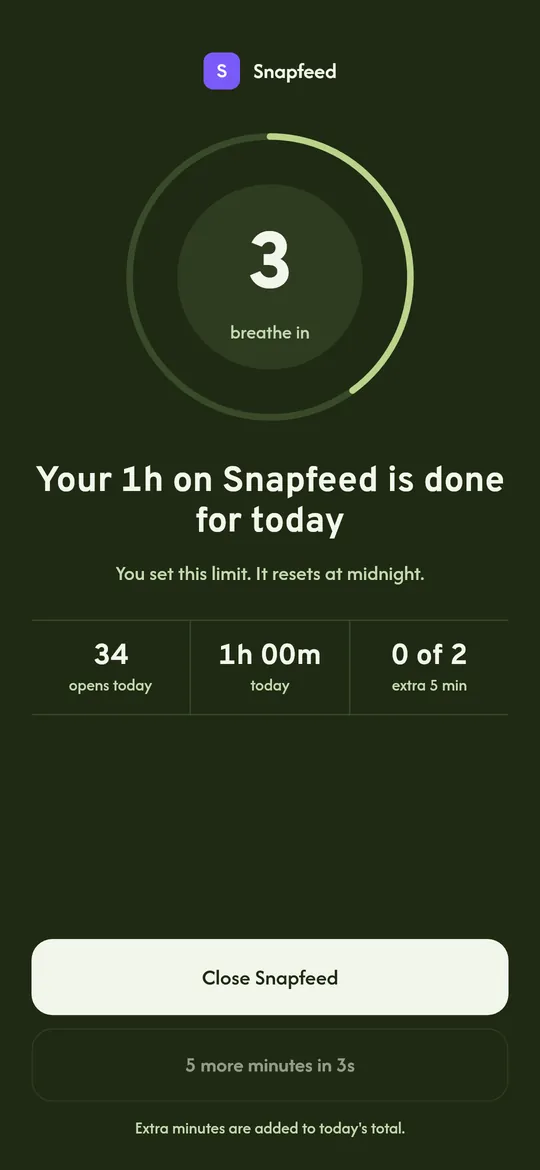
A pause screen when your limit is up. About a second after an app opens past your daily limit in minutes or opens, a breathing pause screen asks you to close it.
Weekly trends against your goal. Bars for each day with a goal line, the change from last week, and time by category: social, video, messaging and games.
Quiet hours. Start a quiet hour now or schedule bedtime for the apps you pick, while calls, messages and alarms keep working.
Free vs Pro
| Feature | Free | Pro |
|---|---|---|
| Screen time, unlocks and pause screen | Included | Included |
| App limits | 3 | Unlimited |
| Quiet-hour schedules | 1 | Unlimited |
| Trends | 7 days | 30 and 90 days |
| Full history | Not included | Included |
| Strict mode | Not included | Included |
| Large widget and CSV export | Not included | Included |
| No ads | Not included | Included |
Questions
How it works
- Turn on Usage access. Android asks once; Hushmoss explains what it reads first.
- See your day. Screen time, unlocks and the apps you opened most, with no tapping.
- Set a limit in 4 taps. Pick an app, choose minutes or opens per day, and save.
Does Hushmoss block apps?
It pauses them. When your daily limit is reached, a pause screen appears about a second after the app opens. It cannot block websites, or Reels and Shorts inside an app, because it only knows which app is open. The pause is a brake, not a lock: you can always change a limit or turn off the permission.
Does it need Accessibility access?
No. Hushmoss uses Android Usage access to see how long each app was open, and Display over other apps only to show the pause screen. It never reads what is on your screen.
Where is my data?
Only on your phone, in the app's private storage. There is no account, nothing is uploaded, and it is not included in Android cloud backup.
Why do I see only about 7 days of history at first?
Android itself keeps detailed app usage for about a week. From the day you install it, Hushmoss saves its own daily summary, so your history grows from there.
Why does the pause screen sometimes not appear?
Some phone brands stop background apps to save battery. Open Settings, then Keep limits running, for steps for your phone and a shortcut to its battery settings.
Is Hushmoss free?
Yes. Screen time, unlocks, the pause screen, 3 app limits, 1 quiet-hour schedule, 7-day trends and a small widget are free. Pro adds unlimited limits and schedules, 30 and 90-day trends with full history, strict mode, a large widget, CSV export and no ads.
Privacy at a glance
- App usage
- Which apps you used, for how long, how many times you opened them, and when you unlocked your phone. Read from Android through Usage access and stored only in the app's private storage on your phone. Not uploaded, not shared, not sent to the ad SDK, and not included in Android cloud backup or device transfer. There is no account.
- Limits and schedules
- Your app limits, quiet hours, goal and pause screen history stay on your phone with the rest of your data.
- CSV export
- Created only when you ask (Pro), and saved or shared only where you choose.
- Purchases
- Handled by Google Play; we never see your payment details.
Permissions: Usage access, which you turn on yourself in Android settings, to read how long each app was open, app opens and unlocks. Display over other apps, asked when you set your first limit, only to show the pause screen. A foreground service with an ongoing notification, running only while you have a limit or quiet-hour schedule on. Notifications, for the daily summary, weekly report and reminders you turn on. Start at boot, so limits keep working after a restart. No Accessibility service, no camera, microphone, location, contacts or storage permission. Internet is used for ads, purchases and crash reports.
Something else? Write to support@tinyfair.my.id.
More from tinyfair
 TracefulOn Google Play
 HearthdaysOn Google Play
 GlidecueOn Google Play
 NightechoOn Google Play
 WeehoursOn Google Play
 BackvoxOn Google Play
 PrintwrenOn Google Play
 BillfinchOn Google Play
 RowberryOn Google Play
 TonewashOn Google Play
 SlidequiltOn Google Play
 FrostdialOn Google Play
 WavetallyOn Google Play
 ShiftRingOn Google Play
 CreasebirdComing soon
 SprychairComing soon
 WinkboothComing soon
 TidepenComing soon