 RenewhawkCancel Subscription
See every renewal before it charges you.
Add what you pay for once. Renewhawk adds up the month, reminds you before each charge and before a free trial ends, and shows step by step how to cancel the ones you no longer use.
- Monthly total and a 30-day line of charges
- Reminders before charges and trial ends
- Step-by-step cancel help, no bank login
Coming soon to Google Play.
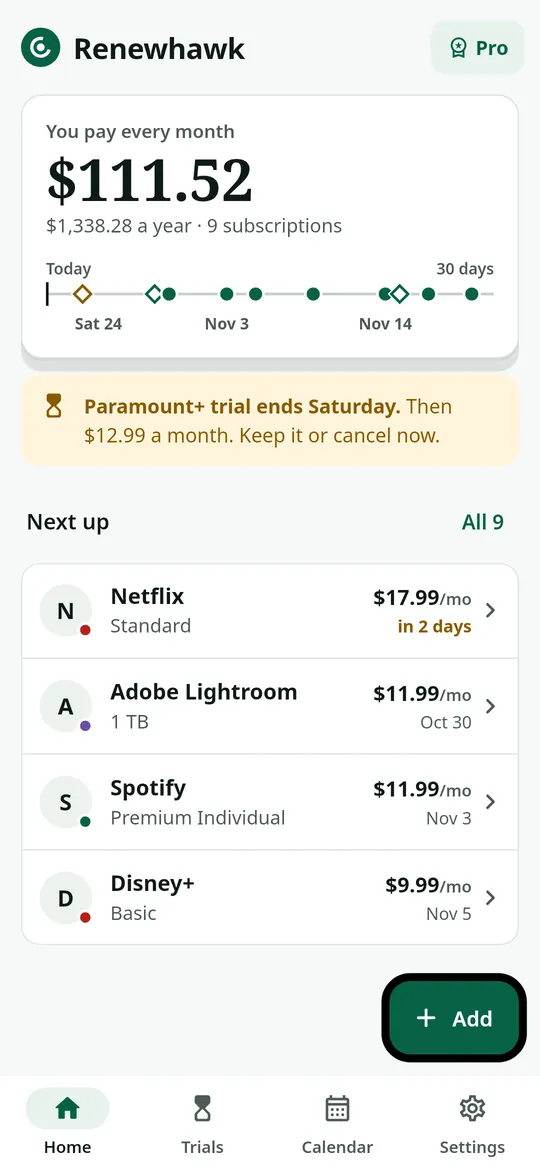
Swipe through Renewhawk
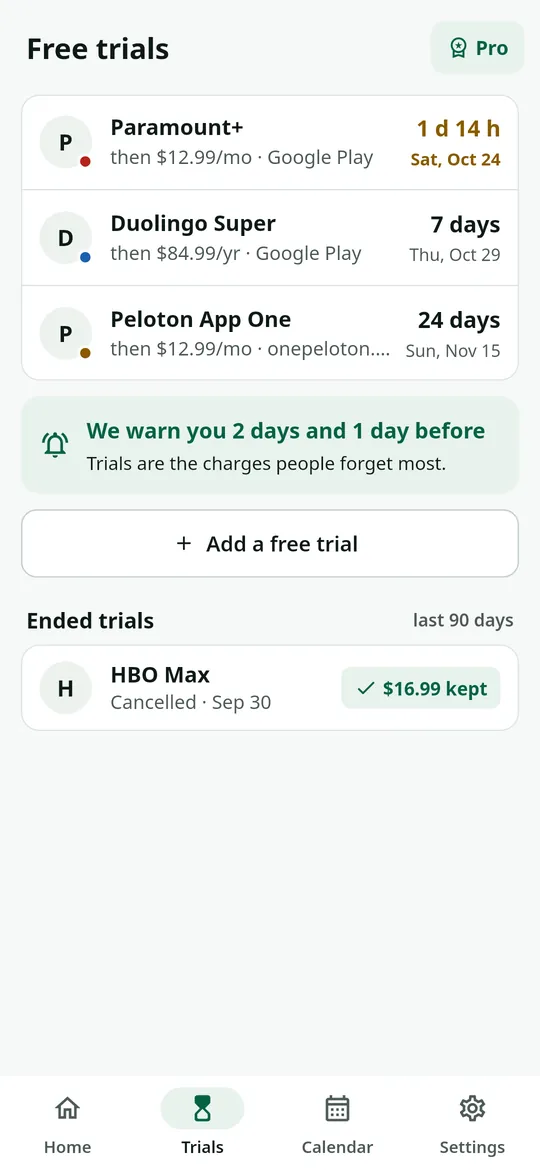
Free trials, counted down 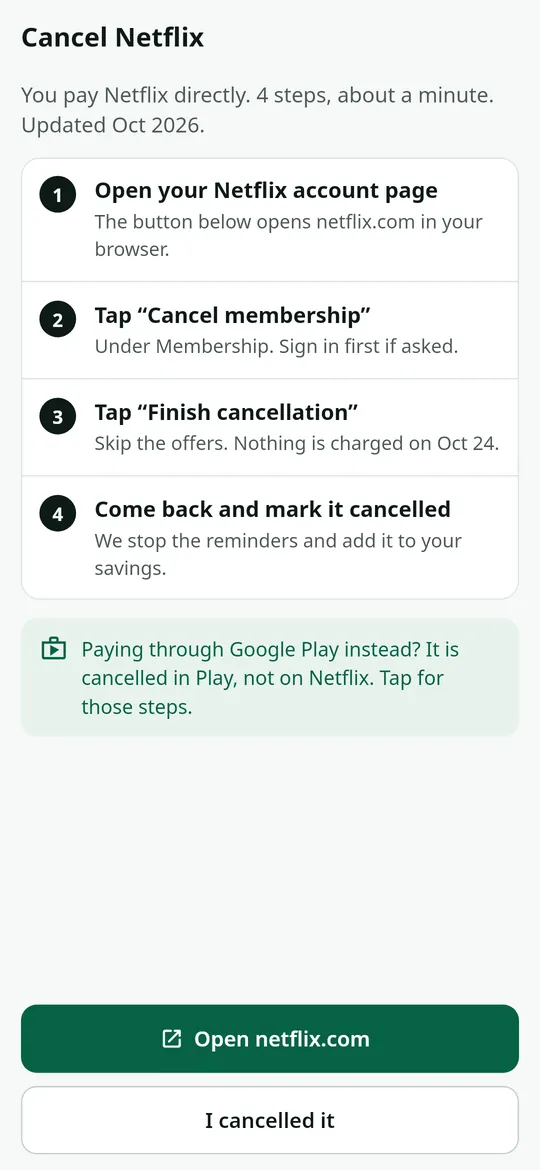
How to cancel, step by step 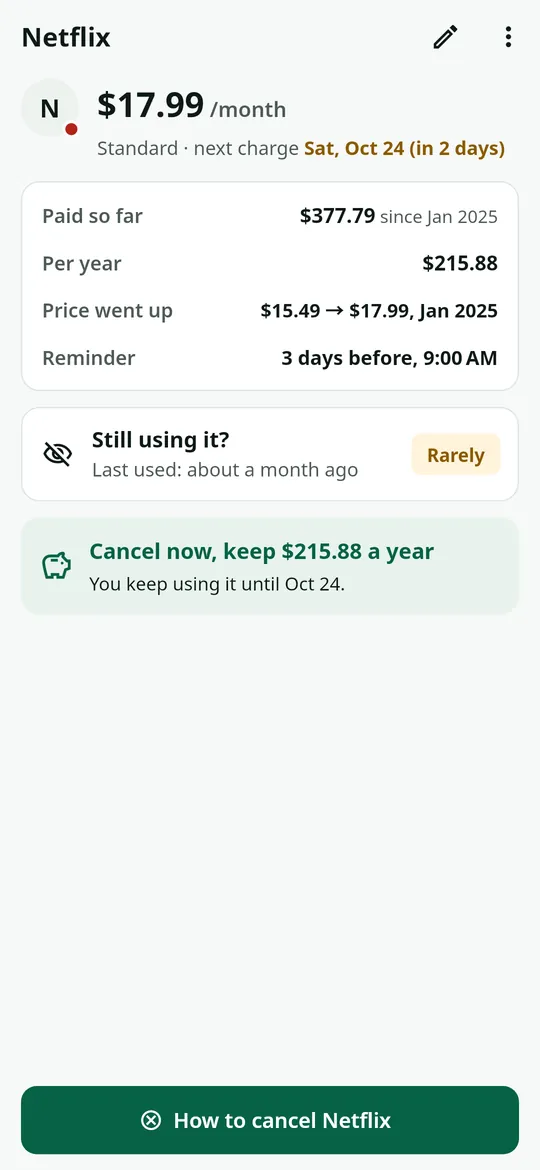
Every subscription in detail
What you can do
Your month at a glance. The total you pay every month and every year, and a 30-day line that marks each upcoming charge.
Free trials, counted down. Trials show how long is left and what they will cost after.
How to cancel, step by step. Steps for the service or for Google Play, a button to the right page, then mark it cancelled to see what you save.
Every subscription in detail. What you paid so far, the price per year, price changes and a gentle "still using it?" check.
Free vs Pro
| Feature | Free | Pro |
|---|---|---|
| Subscriptions tracked | 12 | Unlimited |
| Reminders and free trials | Included | Included |
| Cancel steps | Included | Included |
| Calendar and widget | Not included | Included |
| Several currencies | Not included | Included |
| Export CSV | Not included | Included |
| No ads | Not included | Included |
Questions
How it works
- Add a subscription. Pick a service from the list or type your own. 3 taps for most.
- Get reminded. A notification before each charge and before a trial ends.
- Cancel what you do not use. Follow the steps, then mark it cancelled.
Does Renewhawk connect to my bank?
No. There is no bank login and no email access. You add each subscription yourself, and the list stays on your phone.
Can Renewhawk cancel a subscription for me?
No. It shows the steps and opens the right page. You cancel with the service or in Google Play, then mark it cancelled in Renewhawk.
Are the prices in the list exact?
They are typical US list prices to save typing. Change the price to what your bill says.
Is Renewhawk free?
Yes. Up to 12 subscriptions, all reminders, free trials and cancel steps are free. Pro adds unlimited subscriptions, the calendar, a home screen widget, more than one currency, CSV export and no ads.
Privacy at a glance
- Your subscriptions
- Names, prices, billing dates, trials and notes are saved only in the app's private storage on your phone. They are never uploaded, never sent to us and never passed to the ad SDK. If you use Android device backup, they may be included in that backup, which Google encrypts for your account.
- Reminders
- Scheduled on your phone by Android. No reminder content leaves your phone.
- CSV export
- Created only when you ask (Pro), and saved or shared only where you choose.
- Purchases
- Handled by Google Play; we never see your payment details.
Permissions: Notifications, asked after you save your first subscription, for reminders before charges and trial ends. Start at boot, so reminders are set again after a restart. No exact alarm, camera, microphone, location, contacts or storage permission. Google's ad and purchase libraries add the advertising ID, network state and billing permissions. Internet is used for ads, purchases, crash reports and the small files described above.
Something else? Write to support@tinyfair.my.id.
More from tinyfair
 TracefulOn Google Play
 HearthdaysOn Google Play
 GlidecueOn Google Play
 NightechoOn Google Play
 WeehoursOn Google Play
 BackvoxOn Google Play
 PrintwrenOn Google Play
 BillfinchOn Google Play
 RowberryOn Google Play
 TonewashOn Google Play
 SlidequiltOn Google Play
 FrostdialOn Google Play
 WavetallyOn Google Play
 ShiftRingOn Google Play
 CreasebirdComing soon
 SprychairComing soon
 WinkboothComing soon
 TidepenComing soon
 HushmossComing soon
 TagnibComing soon