 PawsprigPet Care Tracker
Meals, walks and meds for every pet, one tap each.
Tap Fed, Walk, Meds or Water under your pet's photo and the whole family can see it is done. Vaccine and medication reminders, a walk timer and a health record for the vet are free.
- Fed, Walk, Meds and Water in one tap
- Reminders before vaccines and regular meds, free
- No account, data stays on your phone
Coming soon to Google Play.
Swipe through Pawsprig
A walk timer that keeps going 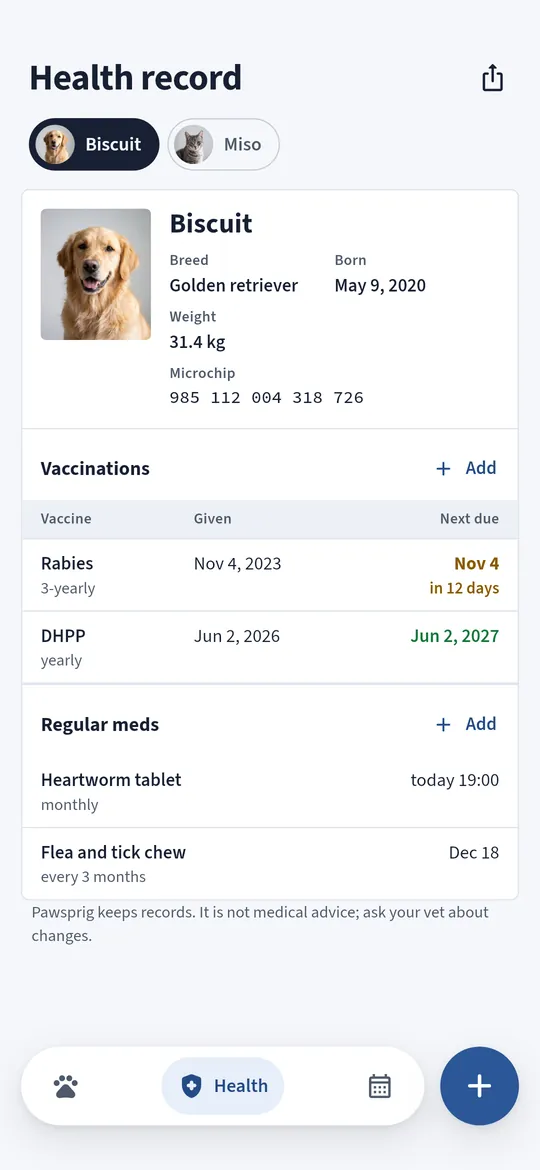
A health record for the vet 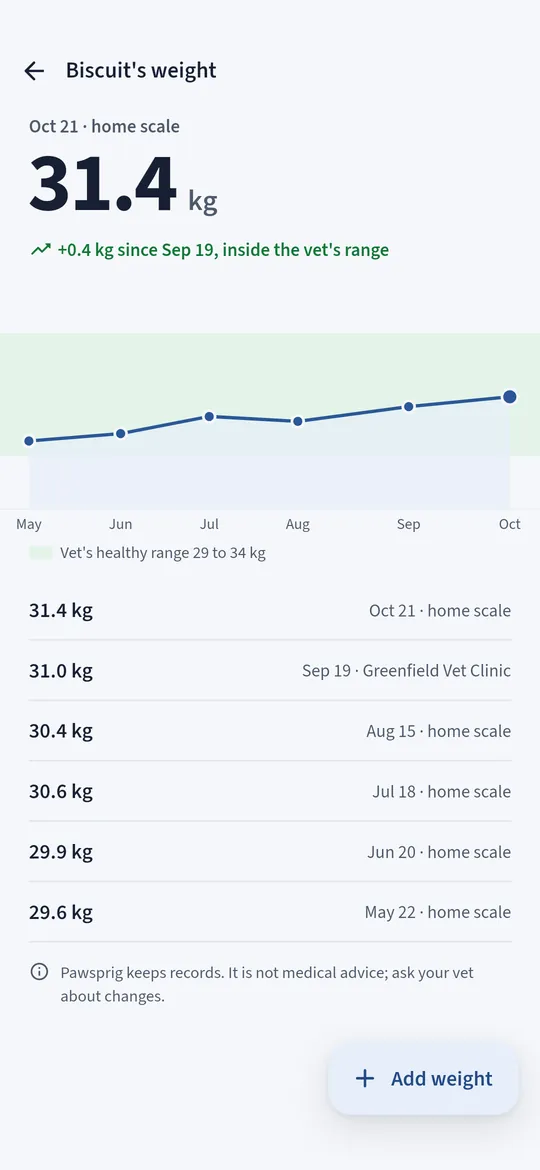
Weight with your vet's range
What you can do
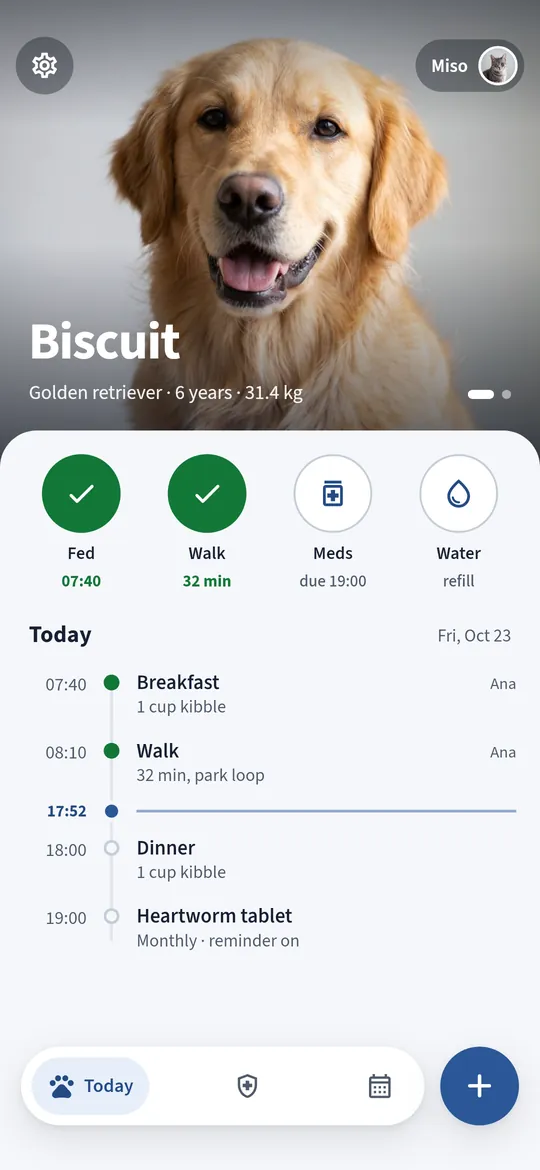
Today, at a glance. Your pet's photo, four round buttons and a timeline of what is done and what is still to come.
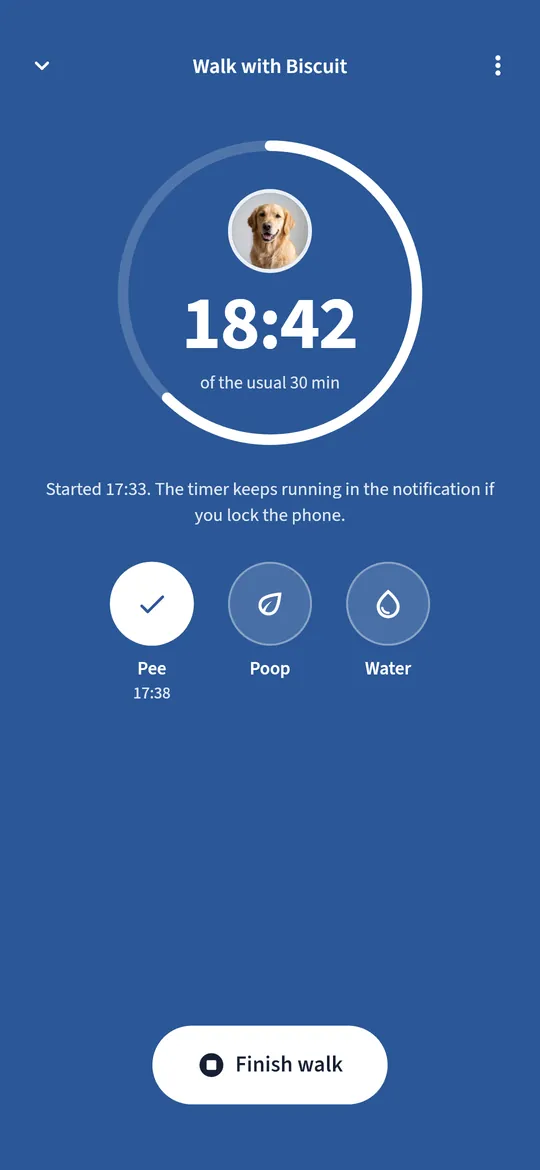
A walk timer that keeps going. Lock the phone and the timer keeps running in a notification.
A health record for the vet. Breed, birthday, weight, microchip, vaccinations with the next due date, and regular meds.
Weight with your vet's range. A chart with the healthy range your vet gave you, and every weight you have entered.
Free vs Pro
| Feature | Free | Pro |
|---|---|---|
| One-tap log and walk timer | Included | Included |
| Pets | 2 | No limit |
| Every reminder and the health record | Included | Included |
| Health record PDF | Not included | Included |
| History and weight chart | 30 days | All |
| Home screen widget | Not included | Included |
| No ads | Not included | Included |
Questions
How it works
- Add your pet. A name, a photo from the Android photo picker, dog or cat, and a birthday.
- Tap when it is done. Fed, Walk, Meds or Water under the photo. The button turns green.
- Add vaccines and meds. Pawsprig reminds you the day before and on the day.
Can my family see the same log?
Pawsprig has no account and no sync, so the log lives on one phone. You can share today's summary as text in your family chat from Settings.
Does the walk timer use GPS?
No. It times the walk and records pee, poop and water. There is no map, route or location permission.
Is it medical advice?
No. Pawsprig keeps records and reminders. Ask your vet about changes in your pet's health.
Is Pawsprig free?
Yes. 2 pets, the one-tap log, the walk timer, every reminder, the whole health record and the last 30 days of history and weight chart are free. Older entries stay on your phone. Pro adds unlimited pets, a health record PDF, full history and weight chart, a home screen widget and no ads.
Privacy at a glance
- Your pets and their records
- Pet profiles, daily notes, walks, vaccinations, meds, weights and the vet details you type are saved only in the app's private storage on your phone, with your settings. They are never uploaded, never sent to us and never passed to the ad SDK. If you use Android device backup, they may be included in that backup, which Google encrypts for your account.
- Pet photos
- Chosen with the Android photo picker, so the app has no access to your gallery and no camera permission. The photo you pick is made smaller and copied into the app's private storage. It never leaves your phone.
- Reminders
- Vaccine, medication, meal and free-trial reminders are scheduled on your phone by Android. No reminder content leaves your phone.
- Home screen widget
- Pro. Shows today's meal, walk and meds for your first pet, read from the app's storage on your phone.
- PDF and shared summaries
- Created only when you ask, and shared only where you choose.
- Purchases
- Handled by Google Play; we never see your payment details.
Permissions: Notifications, asked when you save your first vaccine or medication or start your first walk, for reminders and the walk timer. Start at boot, so reminders are set again after a restart. Vibration and wake lock, so a reminder can arrive while the phone sleeps. No camera, microphone, location, contacts, photos and media, storage, exact alarm or foreground service permission; pet photos come from the Android photo picker. Google's ad and purchase libraries add the advertising ID, network state and billing permissions. Internet is used for ads, purchases, crash reports and the settings file described above.
Something else? Write to support@tinyfair.my.id.
More from tinyfair
 TracefulOn Google Play
 HearthdaysOn Google Play
 GlidecueOn Google Play
 NightechoOn Google Play
 WeehoursOn Google Play
 BackvoxOn Google Play
 PrintwrenOn Google Play
 BillfinchOn Google Play
 RowberryOn Google Play
 TonewashOn Google Play
 SlidequiltOn Google Play
 FrostdialOn Google Play
 WavetallyOn Google Play
 SprychairOn Google Play
 WinkboothOn Google Play
 HushmossOn Google Play
 TagnibOn Google Play
 RenewhawkOn Google Play
 ShiftRingOn Google Play
 CreasebirdComing soon
 TidepenComing soon
 RepcrestComing soon
 TickstaveComing soon
 BrightwickComing soon