 SpoolhumMusic Player
Your music files, on a pocket player.
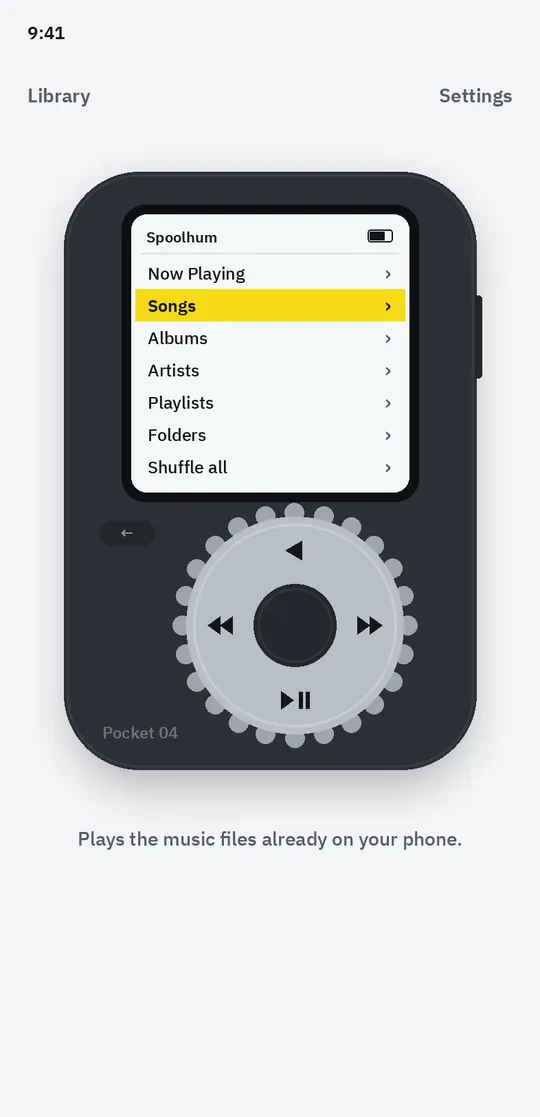
Spoolhum plays the music files already on your phone inside a pocket player with a notched dial, a twin cassette deck or a folding phone. Your library appears in seconds, nothing is uploaded, and there is no streaming and no account.
- Plays your own MP3, FLAC and other music files
- Pocket player with a notched dial is free
- No streaming, no account, nothing uploaded
Coming soon to Google Play.
What you can do
A dial you can feel. Turn the notched dial to scroll, press the centre to play, with a soft click and a light buzz.
Three original devices. A pocket player, a twin cassette deck with spinning reels, and a folding phone with a keypad.
Playlists without limits. Make playlists, label them like a cassette, and set a sleep timer for the night.
Free vs Pro
| Feature | Free | Pro |
|---|---|---|
| Play all your music files, background playback | Included | Included |
| Playlists, queue, favourites and sleep timer | Included | Included |
| Pocket 04 pocket player | Included | Included |
| Deck 86 and Flip 05 devices | 3 min preview | Included |
| Body colours per device | 2 | 8 |
| Equalizer and tape hiss | Not included | Included |
| No ads | Not included | Included |
Questions
How it works
- Allow access to music. Spoolhum reads only the audio files on your phone.
- Pick a device. Start on the pocket player, or try the cassette deck.
- Press play. Shuffle everything, or turn the dial to an album.
Does it stream music?
No. Spoolhum plays music files that are already on your phone or SD card. Add songs by copying them into the Music folder.
Is it free?
Yes. Playing, playlists, the sleep timer and the pocket player are free. Pro adds more devices, colours and the equalizer, and removes ads.
Are my files uploaded?
No. Your music, playlists and settings stay on your phone, and there is no account.
Privacy at a glance
- Your music files
- The app reads song details and cover art from Android's media library to list and play your files. Files are never uploaded, copied to us or changed.
- Playlists and settings
- Your playlists, favourites, play counts and settings are saved in the app on your phone.
- Purchases
- Handled by Google Play; we never see your payment details.
Permissions: Music and audio (READ_MEDIA_AUDIO; storage read on Android 12 and older), to list and play the audio files on your phone; no photos, videos or other files are read. While music plays, the app runs a media playback foreground service and keeps the processor awake so playback continues with the screen off; it stops when you stop the music. Notifications are used for the media controls. Vibration for the dial. No location, camera, microphone, contacts or all-files permission: playlist and backup files use the Android file picker. Google's ad and purchase libraries add the advertising ID, network state and billing permissions. Internet is used for ads, purchases, crash reports, usage statistics and the settings file described above, never for your music.
Something else? Write to support@tinyfair.my.id.
More from tinyfair
 TracefulOn Google Play
 HearthdaysOn Google Play
 GlidecueOn Google Play
 NightechoOn Google Play
 WeehoursOn Google Play
 BackvoxOn Google Play
 PrintwrenOn Google Play
 BillfinchOn Google Play
 RowberryOn Google Play
 TonewashOn Google Play
 SlidequiltOn Google Play
 FrostdialOn Google Play
 WavetallyOn Google Play
 CreasebirdOn Google Play
 SprychairOn Google Play
 WinkboothOn Google Play
 TidepenOn Google Play
 HushmossOn Google Play
 TagnibOn Google Play
 RenewhawkOn Google Play
 RepcrestOn Google Play
 TickstaveOn Google Play
 PawsprigOn Google Play
 BrightwickOn Google Play
 SpinlarkOn Google Play
 BullkiteOn Google Play
 CubejayOn Google Play
 CapternOn Google Play
 CoverswiftOn Google Play
 StillwrenOn Google Play
 PasslarkOn Google Play
 CalendenseOn Google Play
 DockglowOn Google Play
 StampkiteOn Google Play
 ShiftRingOn Google Play
 EvelarkComing soon
 ShelfwrenComing soon
 TallyforgeComing soon
 TillmintComing soon
 BoutbellComing soon
 CuffkeepComing soon
 MoodwrenComing soon
 IronjotComing soon
 WitsprintComing soon