 MoodwrenMood Diary with Lock
A private diary that knows how your days feel.
Moodwren is a diary with a PIN and fingerprint lock and a one-tap daily mood. Write a few lines or a few pages, see your month in colour, and keep an encrypted backup file for free. No account, and your entries stay on your phone.
- PIN and fingerprint lock are free
- Encrypted backup files are free
- No account, entries on your phone
Coming soon to Google Play.
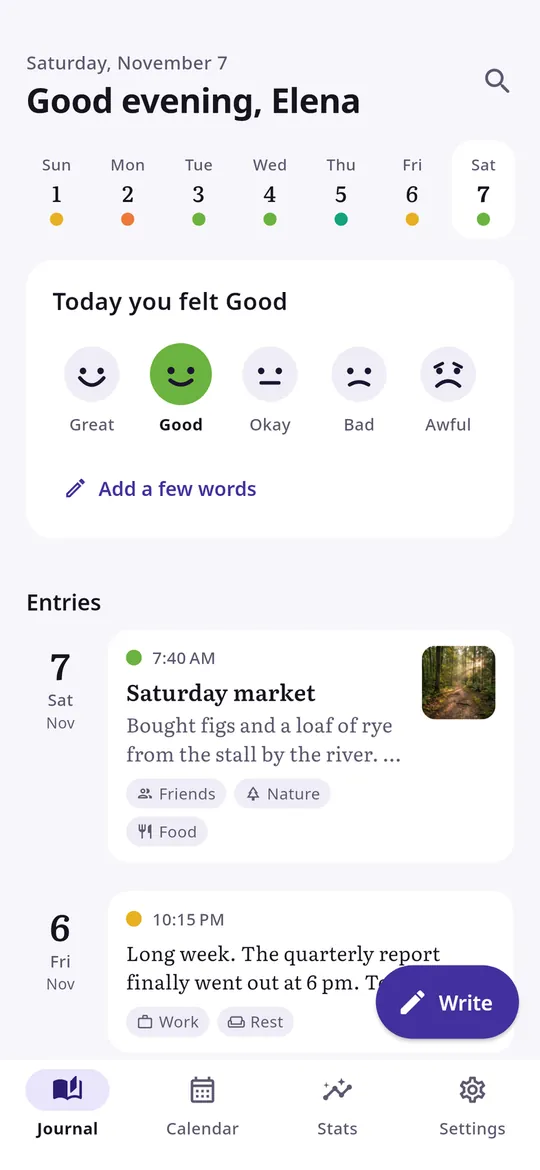
Swipe through Moodwren
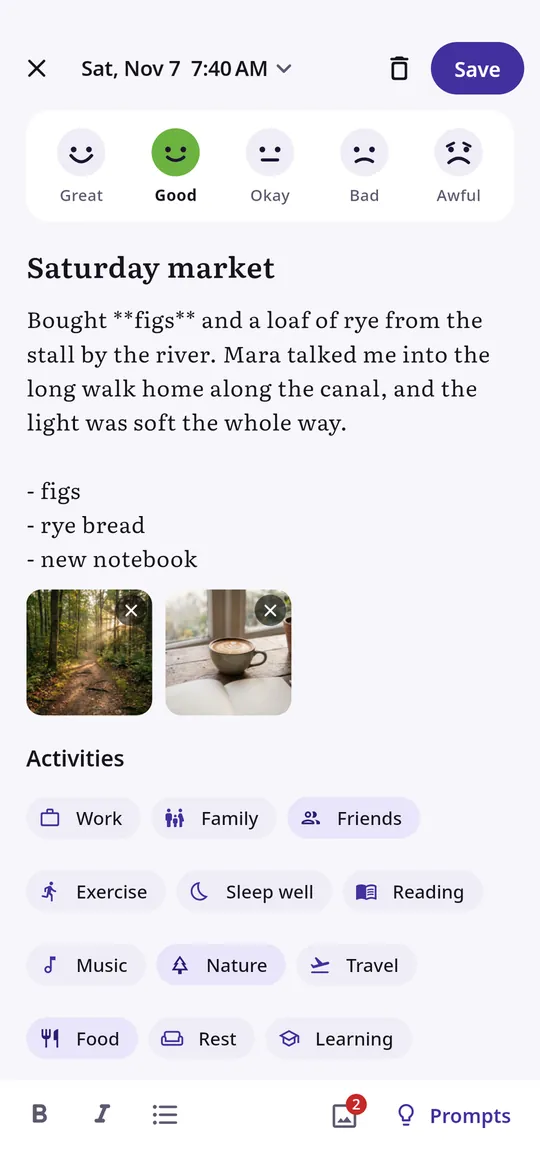
Write the way you like 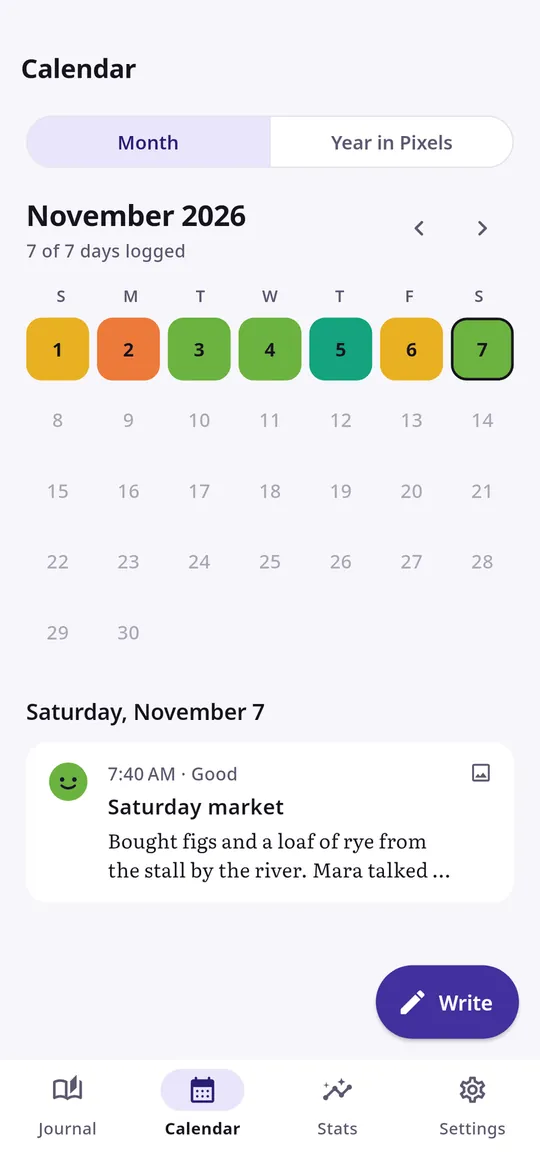
Your year in colour 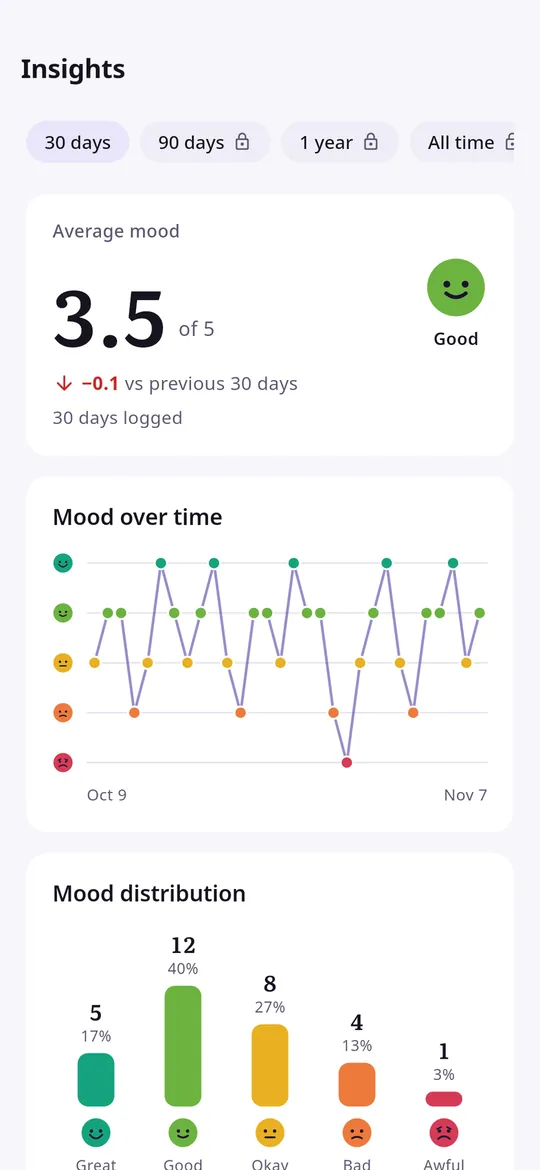
Patterns, not guesses
What you can do
Write the way you like. A few words or a long entry, with bold, lists, photos, activity tags and gentle prompts.
Your year in colour. A calendar coloured by mood and a Year in Pixels view show your good and hard stretches at a glance.
Patterns, not guesses. Average mood, streaks and the activities that show up on your better days.
Free vs Pro
| Feature | Free | Pro |
|---|---|---|
| Diary, mood log, PIN and fingerprint lock | Included | Included |
| Mood calendar and Year in Pixels | Included | Included |
| Backup and restore files | Included | Included |
| Photos per entry | 3 | Unlimited |
| Custom activity tags | 8 | Unlimited |
| Full statistics and activity insights | 30 days | Any range |
| Six extra themes, PDF export, weekly auto backup | Not included | Included |
| No ads | Not included | Included |
Questions
How it works
- Set a PIN. Add your fingerprint too, and save your recovery code.
- Pick a reminder time. Log your mood straight from the notification.
- Write when you want to. Add a few words, a photo or a prompt answer to any day.
Can anyone read my diary?
Moodwren opens only with your PIN or fingerprint. There is no account and your entries are never sent to us.
What if I lose my phone?
Make a backup file in Settings, protected by a password you choose, and keep it on Google Drive or your computer. Backups are free.
What if I forget my PIN?
Use the recovery code shown when you set up the app to choose a new PIN.
Privacy at a glance
- Diary entries and moods
- Your entries, moods, tags, photos and settings are saved in the app on your phone. Photos you add are copied into the app's own storage.
- PIN and fingerprint
- Your PIN is stored only as a salted hash. Fingerprint checks are done by Android; the app never receives your fingerprint.
- Backup files
- A backup file is created only when you ask for it, encrypted with a password you choose, and saved where you pick with the Android file picker. We never receive it.
- Purchases
- Handled by Google Play; we never see your payment details.
Permissions: Notifications, for the daily reminder with mood buttons and the optional backup reminder. Biometric, to unlock with your fingerprint or face if you turn it on. Photos are chosen with the Android photo picker and backups are saved with the Android file picker, so no storage, camera, location, microphone or contacts permission is needed. Google's ad and purchase libraries add the advertising ID, network state and billing permissions. Internet is used for ads, purchases, crash reports, usage statistics and the settings file described above, never for your diary.
Something else? Write to support@tinyfair.my.id.
More from tinyfair
 TracefulOn Google Play
 HearthdaysOn Google Play
 GlidecueOn Google Play
 NightechoOn Google Play
 WeehoursOn Google Play
 BackvoxOn Google Play
 PrintwrenOn Google Play
 BillfinchOn Google Play
 RowberryOn Google Play
 TonewashOn Google Play
 SlidequiltOn Google Play
 FrostdialOn Google Play
 WavetallyOn Google Play
 CreasebirdOn Google Play
 SprychairOn Google Play
 WinkboothOn Google Play
 TidepenOn Google Play
 HushmossOn Google Play
 TagnibOn Google Play
 RenewhawkOn Google Play
 RepcrestOn Google Play
 TickstaveOn Google Play
 PawsprigOn Google Play
 BrightwickOn Google Play
 SpinlarkOn Google Play
 BullkiteOn Google Play
 CubejayOn Google Play
 CapternOn Google Play
 CoverswiftOn Google Play
 StillwrenOn Google Play
 PasslarkOn Google Play
 CalendenseOn Google Play
 DockglowOn Google Play
 StampkiteOn Google Play
 ShiftRingOn Google Play
 EvelarkComing soon
 ShelfwrenComing soon
 TallyforgeComing soon
 TillmintComing soon
 BoutbellComing soon
 CuffkeepComing soon
 SpoolhumComing soon
 IronjotComing soon
 WitsprintComing soon
 LamplingComing soon