 LamplingFocus Timer
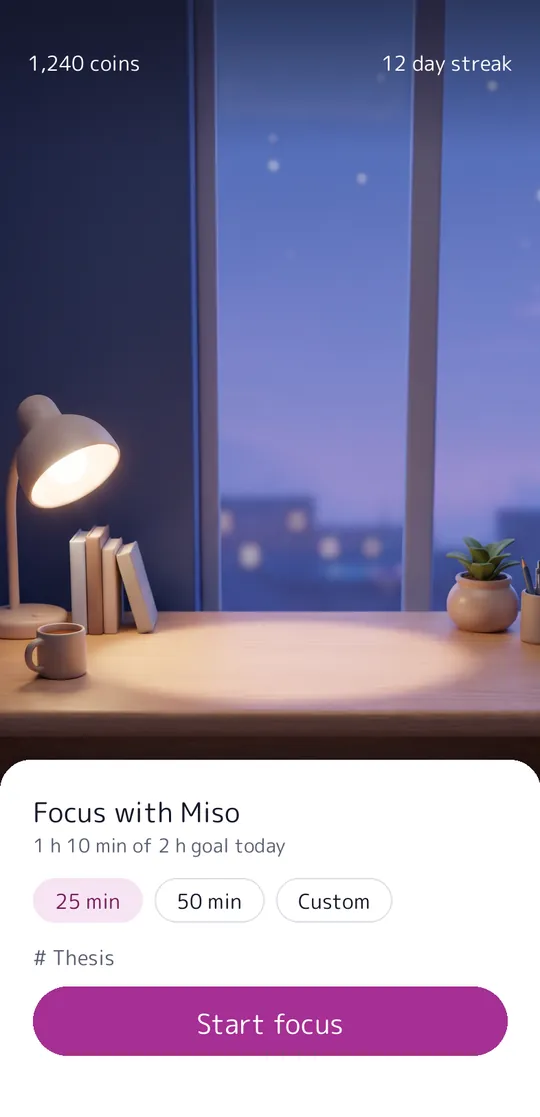
Focus with a pet who studies with you.
Lampling is a focus timer with a small study pet under your desk lamp. Start a session, stay in the app, and your pet reads along with you. Leave for more than 10 seconds and it gets sad. The timer, breaks, tags, basic stats and the widget are free.
- Timer, breaks, strict mode, tags and widget for free
- Your pet studies with you and grows as you focus
- No account, sessions on your phone
Coming soon to Google Play.
What you can do
A pet that grows with you. Miso the round cat reads, writes and naps with you, and grows up as your focus minutes add up.
Coins for every minute. Each focused minute earns a coin to spend on new rooms and sounds.
See where your time goes. Today, the last 7 days, your streak and time per tag.
Free vs Pro
| Feature | Free | Pro |
|---|---|---|
| Focus timer, breaks, auto-start and strict mode | Included | Included |
| Tags, today and 7-day stats, streak, widget, backup | Included | Included |
| Pets | Miso | Miso and Pip |
| Rooms | 5 | 8 |
| Pet colors | Not included | Included |
| Coins per focused minute | 1 | 2 |
| Month and year stats, 12-week heatmap, CSV export | Not included | Included |
| No ads | Not included | Included |
Questions
How it works
- Pick a length. 25 or 50 minutes, or anything from 10 to 120.
- Stay with your pet. It studies at the desk while the timer runs.
- Take a break. Collect your coins, rest, then go again.
Is the timer free?
Yes. The timer, breaks, auto-start, strict mode, tags, basic stats, the widget and backups are free. Pro adds Pip the owl, extra rooms, colors and sounds, detailed stats, double coins, and removes ads.
Does locking my phone fail a session?
No. Only leaving Lampling for another app for more than 10 seconds does, and you can turn strict mode off.
How do I keep my progress?
Use Export backup in Settings to save a backup file where you choose, and import it on a new phone.
Privacy at a glance
- Sessions and progress
- Your focus sessions, tags, pet name, coins, levels, items and settings are saved only in the app on your phone. They are never sent to us, and the ad SDK never receives them.
- Backup files
- A backup file (JSON) is made only when you ask for it, and you choose where it goes with the Android share sheet or file picker. Files you import are read on your phone.
- Purchases
- Handled by Google Play; we never see your payment details.
Permissions: Notifications, asked during setup, for the "come back" alert when you leave a running session, the session and break end alerts, and your optional daily reminder; the reminder is set again after the phone restarts. Vibration for cues. The screen can stay on during a session (no permission needed). No usage access, overlay, accessibility, location, camera, microphone, contacts or storage permission: backup files use the Android file picker. Google's ad and purchase libraries add the advertising ID, network state and billing permissions. Internet is used for ads, purchases, crash reports, usage statistics and the settings file described above, never for your sessions.
Something else? Write to support@tinyfair.my.id.
More from tinyfair
 TracefulOn Google Play
 HearthdaysOn Google Play
 GlidecueOn Google Play
 NightechoOn Google Play
 WeehoursOn Google Play
 BackvoxOn Google Play
 PrintwrenOn Google Play
 BillfinchOn Google Play
 RowberryOn Google Play
 TonewashOn Google Play
 SlidequiltOn Google Play
 FrostdialOn Google Play
 WavetallyOn Google Play
 CreasebirdOn Google Play
 SprychairOn Google Play
 WinkboothOn Google Play
 TidepenOn Google Play
 HushmossOn Google Play
 TagnibOn Google Play
 RenewhawkOn Google Play
 RepcrestOn Google Play
 TickstaveOn Google Play
 PawsprigOn Google Play
 BrightwickOn Google Play
 SpinlarkOn Google Play
 BullkiteOn Google Play
 CubejayOn Google Play
 CapternOn Google Play
 CoverswiftOn Google Play
 StillwrenOn Google Play
 PasslarkOn Google Play
 CalendenseOn Google Play
 DockglowOn Google Play
 StampkiteOn Google Play
 ShiftRingOn Google Play
 EvelarkComing soon
 ShelfwrenComing soon
 TallyforgeComing soon
 TillmintComing soon
 BoutbellComing soon
 CuffkeepComing soon
 SpoolhumComing soon
 MoodwrenComing soon
 IronjotComing soon
 WitsprintComing soon