 VersewrenDaily Bible Verse
One verse, one quiet moment.
Scroll the Bible one verse at a time over calm landscapes, read any chapter in 19 public-domain translations, and keep a daily habit with morning and evening prayers. The whole Bible is free and works offline.
- Verse feed, one verse per screen
- No ads while you read or pray
- Offline, no account, 19 public-domain translations
Coming soon to Google Play.

Swipe through Versewren
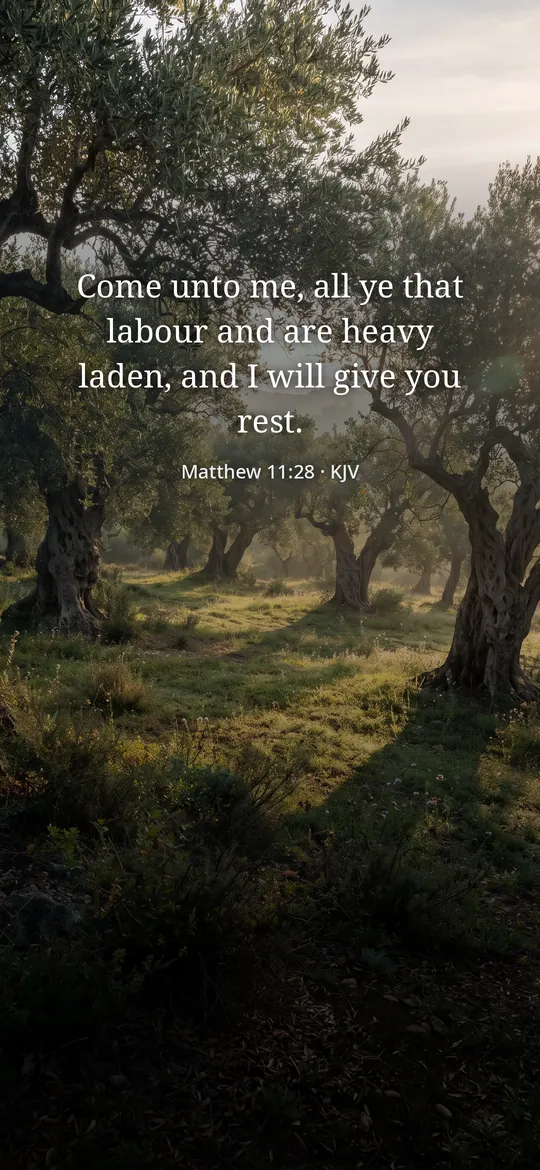
Read the whole Bible offline 
A daily habit
What you can do
Scroll verses, one per screen. Swipe up for the next verse over a calm photo.
Read the whole Bible offline. Old and New Testament in 19 translations, with search, highlights in four colors, notes and adjustable text size.
A daily habit. The verse of the day, a morning and an evening prayer, a reading plan and a candle that keeps your streak.
Free vs Pro
| Feature | Free | Pro |
|---|---|---|
| Whole Bible, verse feed, verse of the day | Included | Included |
| Reading plans | 1 | All |
| Bible stories and verses for every feeling | Some | All |
| Listen to whole chapters | Not included | Included |
| Backgrounds for verse images | 4 | All |
| Candle and streak widget | Not included | Included |
| No ads | Not included | Included |
Questions
How it works
- Open the app. The first verse is already on screen. No sign-up and no questions first.
- Swipe up. One verse per screen. Save the ones that speak to you.
- Come back tomorrow. A gentle reminder with the verse of the day keeps your streak going.
Is the Bible text accurate?
Yes. Every translation is a public-domain text from eBible.org, shown word for word. Nothing is written or changed by AI.
Which translations are included?
English KJV, WEB, Berean Standard Bible and Douay-Rheims, plus Reina-Valera 1909, Louis Segond 1910, Luther 1912, Riveduta, Russian Synodal, Chinese Union Version and more, 19 in total.
Do I need an account or internet?
No. The Bible, your saved verses, highlights and notes work offline on your phone. Internet is only used for ads, purchases and crash reports.
What does Pro add?
All reading plans and Bible stories, verses for every feeling, listening to whole chapters, all backgrounds for verse images, the candle and streak widget, and no ads.
Privacy at a glance
- Saved verses, highlights and notes
- Your saved verses, highlights, notes, reading position, streak, plan progress and settings are saved only in the app's private storage on your phone. They are never sent to us, and the ad SDK never receives them.
- Verse images and wallpapers
- A verse image is created on your phone when you ask for it. You choose where it goes with the Android share sheet, or set it as your wallpaper (the only reason the app has the wallpaper permission).
- Listening
- Chapters are read aloud by the text-to-speech engine already on your phone. The text is not sent to us.
- Reminders and widget
- The daily verse and prayer reminders are scheduled on your phone by Android. The home screen widget reads the verse from the app on your phone.
- Purchases
- Handled by Google Play; we never see your payment details.
Permissions: Notifications, for the daily verse and prayer reminders you turn on; reminders are set again after the phone restarts (start at boot). Set wallpaper, used only when you choose to set a verse image as your wallpaper. No camera, microphone, location, contacts, photos or storage permission, no exact alarm and no foreground service. Google's ad and purchase libraries add the advertising ID, network state and billing permissions. Internet is used for ads, purchases, crash reports, usage statistics and the settings file described above, never for what you read.
Something else? Write to support@tinyfair.my.id.
More from tinyfair
 TracefulOn Google Play
 HearthdaysOn Google Play
 GlidecueOn Google Play
 NightechoOn Google Play
 WeehoursOn Google Play
 BackvoxOn Google Play
 PrintwrenOn Google Play
 BillfinchOn Google Play
 RowberryOn Google Play
 TonewashOn Google Play
 SlidequiltOn Google Play
 FrostdialOn Google Play
 WavetallyOn Google Play
 CreasebirdOn Google Play
 SprychairOn Google Play
 WinkboothOn Google Play
 TidepenOn Google Play
 HushmossOn Google Play
 TagnibOn Google Play
 RenewhawkOn Google Play
 RepcrestOn Google Play
 TickstaveOn Google Play
 PawsprigOn Google Play
 BrightwickOn Google Play
 SpinlarkOn Google Play
 BullkiteOn Google Play
 CubejayOn Google Play
 CapternOn Google Play
 CoverswiftOn Google Play
 StillwrenOn Google Play
 PasslarkOn Google Play
 CalendenseOn Google Play
 DockglowOn Google Play
 EvelarkOn Google Play
 StampkiteOn Google Play
 ShelfwrenOn Google Play
 TallyforgeOn Google Play
 TillmintOn Google Play
 BoutbellOn Google Play
 CuffkeepOn Google Play
 SpoolhumOn Google Play
 MoodwrenOn Google Play
 IronjotOn Google Play
 WitsprintOn Google Play
 LamplingOn Google Play
 InklarkOn Google Play
 ShiftRingOn Google Play
 PitchfinchComing soon