 NurwellPrayer Times & Adhan
Pray on time. Every day.
Nurwell shows accurate prayer times for your city, plays the adhan on time, points you to the qibla and keeps a gentle daily checklist of your prayers and good deeds. It works offline, with respectful ads that never appear during prayer, Quran or dua.
- Accurate offline prayer times for your city
- Adhan on time with a sound for each prayer
- Qibla compass, Quran and dhikr, free


Swipe through Nurwell

Daily salah checklist 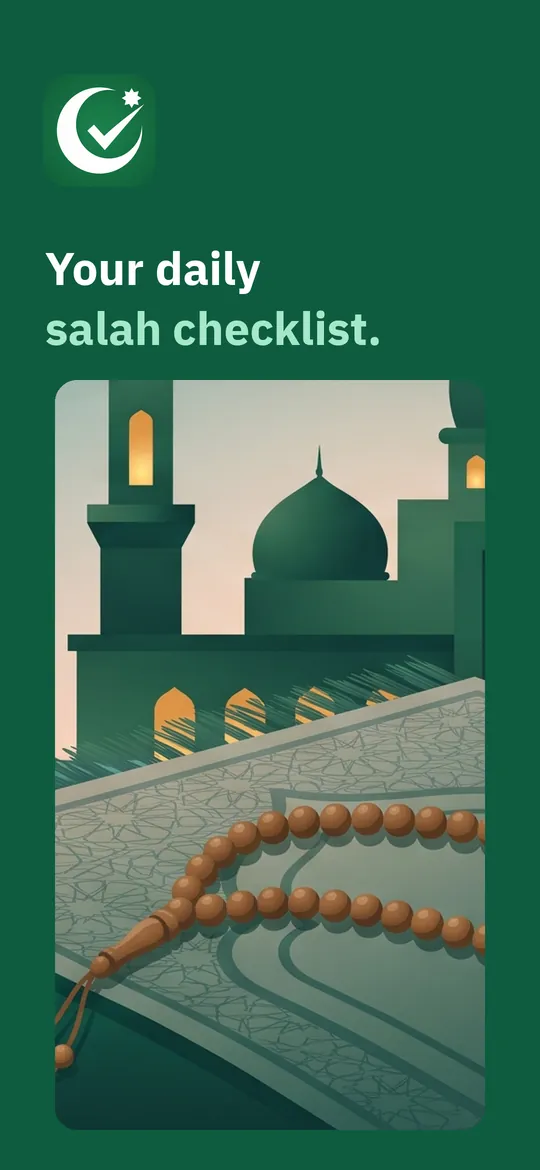
Quran, dhikr and calendar
What you can do
Prayer times and adhan. Five daily prayers plus imsak and sunrise, offline.
Daily salah checklist. Tick each prayer as on time, late or in congregation, add sunnah prayers and daily deeds, and keep your streak.
Quran, dhikr and calendar. Read the Quran with translation, count dhikr with a tasbih, and follow the Hijri calendar and sunnah fasts.
Free vs Pro
| Feature | Free | Pro |
|---|---|---|
| Prayer times, adhan, Fajr alarm and qibla | Included | Included |
| Quran, dhikr, tasbih and calendar | Included | Included |
| Daily prayer and deeds checklist with streaks | Included | Included |
| Custom deeds | 3 | Unlimited |
| Statistics | 7 days | All periods |
| Home screen widgets | 2 | All styles |
| Extra themes | Not included | Included |
| No ads | Not included | Included |
Questions
How it works
- Choose your city. Pick it from the offline list or use your location once. No account.
- Check the method. The usual method for your country is set for you. Adjust it if your mosque differs.
- Hear the adhan, tick your prayer. Mark it done right from the adhan notification or the home screen.
Does it need the internet?
No. Prayer times are calculated on your phone, and the city list is built in. The internet is only used for ads, purchases and crash reports.
The times differ from my mosque. What can I do?
Choose the calculation method your mosque uses and add a minute correction to any prayer in Settings.
Is the qibla compass free?
Yes, completely. The compass, calibration and accuracy display are never locked behind Pro.
What does Pro add?
No ads, unlimited custom deeds, full statistics, all widget styles and themes, and more Pro tools in the app.
Privacy at a glance
- Location
- If you choose "use my location", the app reads your position once to find your city and calculate prayer times and the qibla direction. It is kept on your device and never sent to us or to the ad SDK. You can pick your city from the built-in list instead and deny the permission.
- Prayer checklist and deeds
- What you tick, your streaks, missed prayers to make up and your notes stay in the app's private storage on your device. We never receive them, and usage statistics never include which prayers or deeds you track.
- Quran and reading progress
- Bookmarks, last read position and your khatam goal stay on your device.
- Purchases
- Handled by Google Play; we never see your payment details.
Permissions: Location (optional, only while you use the app, to find your city once; you can pick a city instead). Notifications and exact alarms, to play the adhan and reminders on time; start at boot, so alarms survive a restart; a short media playback service while the adhan sounds; vibration. Motion sensors for the qibla compass (no permission needed). Optional Do Not Disturb access only if you turn on silent mode during prayer. Google's ad and purchase libraries add the advertising ID, network state and billing permissions. Internet is used for ads, purchases, crash reports, usage statistics and the settings file described above, never for your location or checklist.
Something else? Write to support@tinyfair.my.id.
More from tinyfair
 TracefulOn Google Play
 HearthdaysOn Google Play
 GlidecueOn Google Play
 NightechoOn Google Play
 WeehoursOn Google Play
 BackvoxOn Google Play
 PrintwrenOn Google Play
 BillfinchOn Google Play
 RowberryOn Google Play
 TonewashOn Google Play
 SlidequiltOn Google Play
 FrostdialOn Google Play
 WavetallyOn Google Play
 CreasebirdOn Google Play
 SprychairOn Google Play
 WinkboothOn Google Play
 TidepenOn Google Play
 HushmossOn Google Play
 TagnibOn Google Play
 RenewhawkOn Google Play
 RepcrestOn Google Play
 TickstaveOn Google Play
 PawsprigOn Google Play
 BrightwickOn Google Play
 SpinlarkOn Google Play
 BullkiteOn Google Play
 CubejayOn Google Play
 CapternOn Google Play
 CoverswiftOn Google Play
 StillwrenOn Google Play
 PasslarkOn Google Play
 CalendenseOn Google Play
 DockglowOn Google Play
 EvelarkOn Google Play
 StampkiteOn Google Play
 ShelfwrenOn Google Play
 TallyforgeOn Google Play
 TillmintOn Google Play
 BoutbellOn Google Play
 CuffkeepOn Google Play
 SpoolhumOn Google Play
 MoodwrenOn Google Play
 IronjotOn Google Play
 WitsprintOn Google Play
 LamplingOn Google Play
 InklarkOn Google Play
 PitchfinchOn Google Play
 MealwrenOn Google Play
 ShiftRingOn Google Play
 VersewrenComing soon
 ChorebloomComing soon
 BlurwrenComing soon
 NotiwrenComing soon
 SiftwrenComing soon
NurwellFree on Google Play