 FastwrenIntermittent Fasting
Your fast, hour by hour.
Fastwren is an intermittent fasting tracker: start a 16:8 or any other plan with one tap, watch the ring fill from night to dawn, and see the general body stages a fast may pass through. Fasts, weight and water stay on your phone. It works offline and needs no account.
- Every feature can be tried free, with limits
- Body stages, widgets and reminders
- Offline, no account, data stays on your phone
Coming soon to Google Play.
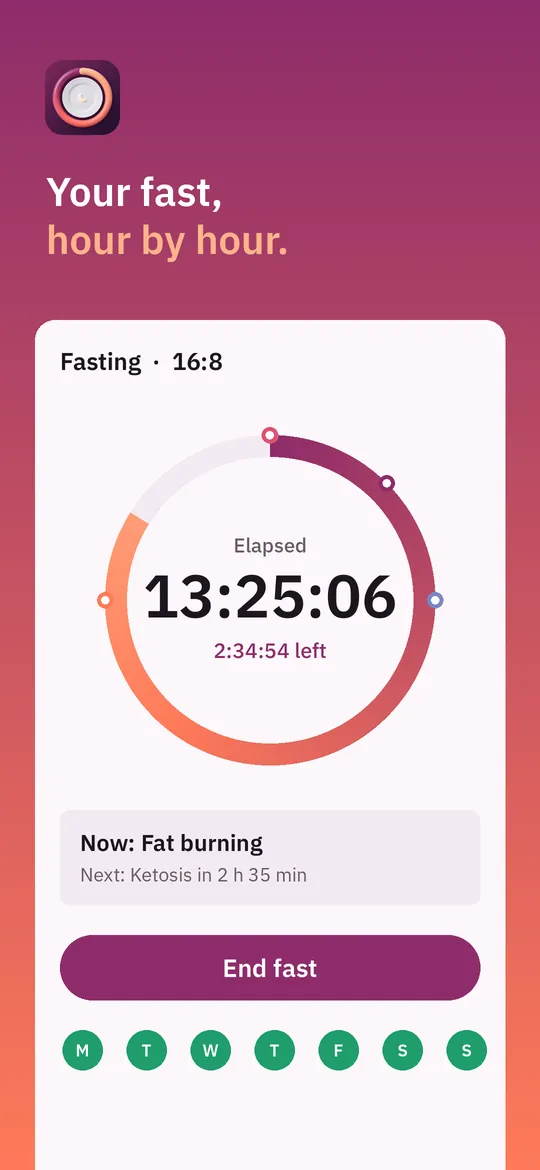
Swipe through Fastwren
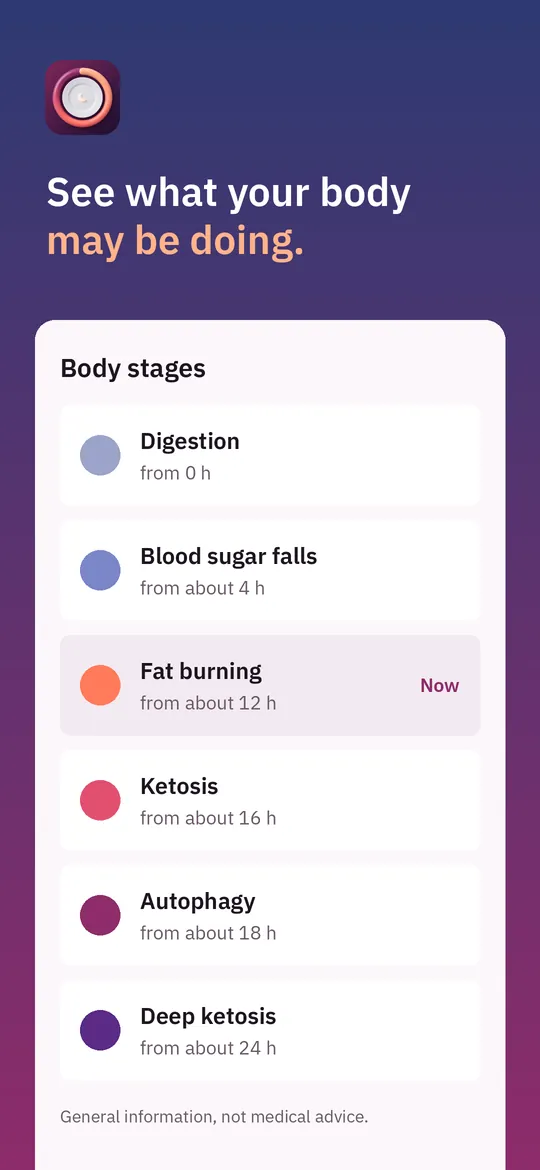
Body stages 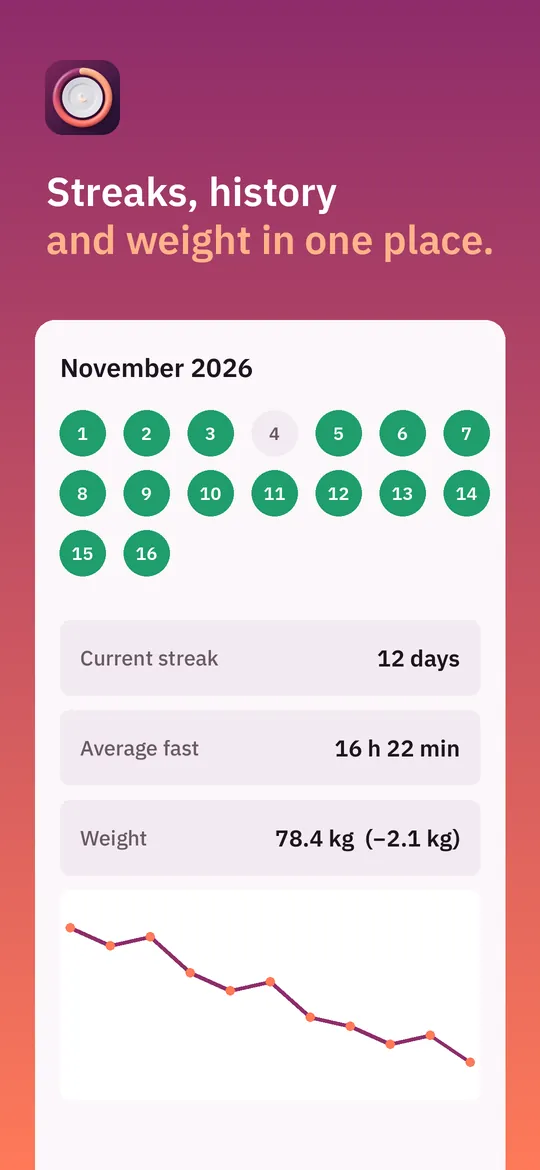
Streaks, history and weight
What you can do
One-tap timer. Start or end a fast with one tap, or move the start time back if you forgot.
Body stages. See which general stage a fast may be in, from digestion to ketosis and autophagy, with short explanations.
Streaks, history and weight. A calendar of your fasts, streaks, notes and mood, weekly statistics, and a weight chart with BMI.
Widgets, reminders and share cards. Widgets show your fast on the home screen, reminders tell you when to start and end, and a share card shows your result.
Free vs Pro
| Feature | Free | Pro |
|---|---|---|
| Timer, start, end and edit times, streak | Included | Included |
| Fasting plans | 3 plans + 1 custom | All plans and long fasts |
| Body stages in detail | First 3 | All |
| History | Last 14 days | Full history |
| Statistics | This week | All periods |
| Weight chart | 30 days | All periods + goal |
| Water reminders | 1 a day | Repeating |
| Reminders | Start and end | All + live notification |
| Widgets | Small | All sizes |
| Notes and mood | 3 a week | Unlimited |
| Programs | 7-day | All |
| Learn cards | 10 | All |
| Export CSV | Not included | Included |
| No ads | Not included | Included |
Questions
How it works
- Pick a plan. Choose 16:8 or another plan, and set your usual eating window.
- Start your fast. Tap Start. The ring, widget and reminders follow your fast.
- End and review. Tap End fast to save it, then check your streak, notes and weight.
Is Fastwren medical advice?
No. Fastwren is not a medical device and does not give medical advice. Talk to a doctor before fasting, especially if you are pregnant or breastfeeding, have diabetes, are under 18 or have a history of eating disorders.
Does it work without internet?
Yes. You can start and end fasts, log weight and water and see your history offline. Internet is only used for ads, purchases and the small settings file described in the privacy policy.
Where is my data stored?
Only on your phone. We have no accounts or servers. You can make a backup file yourself and choose where to keep it.
What happens to old fasts on the free plan?
They stay saved. The free plan shows the last 14 days; Pro shows your full history.
Privacy at a glance
- Fasts, weight, water and notes
- Your fasts, plans, weight, height, water, notes, mood and settings are health and fitness information. They are stored only in the app's private storage on your device. We never receive them, and they are never sent to us, to Google Analytics, to Crashlytics, to the ad SDK or to anyone else.
- Backups and CSV files
- A backup or CSV file is made only when you ask for it, and you choose where it goes with the Android file picker. Android Auto Backup may include the app's data in your own Google account backup if you have it turned on; we cannot read it.
- Cards you share
- Share cards are images made on your phone and sent only where you choose with the Android share sheet. We never see them.
- Purchases
- Handled by Google Play; we never see your payment details.
Permissions: Notifications, for the running fast, the start and end reminders and the other reminders you turn on; they are set again after the device restarts (start at boot). Home screen widgets need no permission. No camera, microphone, location, contacts, storage or Health Connect permission: backup and CSV files go through the Android file picker, and share cards go through the share sheet you choose. Google's ad and purchase libraries add the advertising ID, network state and billing permissions. Internet is used for ads, purchases, crash reports, usage statistics and the settings file described above, never to upload your health information.
Something else? Write to support@tinyfair.my.id.
More from tinyfair
 TracefulOn Google Play
 HearthdaysOn Google Play
 GlidecueOn Google Play
 NightechoOn Google Play
 WeehoursOn Google Play
 BackvoxOn Google Play
 PrintwrenOn Google Play
 BillfinchOn Google Play
 RowberryOn Google Play
 TonewashOn Google Play
 SlidequiltOn Google Play
 FrostdialOn Google Play
 WavetallyOn Google Play
 CreasebirdOn Google Play
 SprychairOn Google Play
 WinkboothOn Google Play
 TidepenOn Google Play
 HushmossOn Google Play
 TagnibOn Google Play
 RenewhawkOn Google Play
 RepcrestOn Google Play
 TickstaveOn Google Play
 PawsprigOn Google Play
 BrightwickOn Google Play
 SpinlarkOn Google Play
 BullkiteOn Google Play
 CubejayOn Google Play
 CapternOn Google Play
 CoverswiftOn Google Play
 StillwrenOn Google Play
 PasslarkOn Google Play
 CalendenseOn Google Play
 DockglowOn Google Play
 EvelarkOn Google Play
 StampkiteOn Google Play
 ShelfwrenOn Google Play
 TallyforgeOn Google Play
 TillmintOn Google Play
 BoutbellOn Google Play
 CuffkeepOn Google Play
 SpoolhumOn Google Play
 MoodwrenOn Google Play
 IronjotOn Google Play
 WitsprintOn Google Play
 LamplingOn Google Play
 InklarkOn Google Play
 VersewrenOn Google Play
 PitchfinchOn Google Play
 ChorebloomOn Google Play
 BlurwrenOn Google Play
 NurwellOn Google Play
 MealwrenOn Google Play
 NotiwrenOn Google Play
 RoomwrenOn Google Play
 ChatwrenOn Google Play
 RevfinchOn Google Play
 SketchwrenOn Google Play
 ShiftRingOn Google Play
 SeamwrenComing soon
 SiftwrenComing soon
 GuesslarkComing soon